Tuesday, February 21, 2012
Spring Cleaning Jumpstart
I did a HUGE purge this time. And, I ended up with a wonderfully organized activewear drawer:
And my closet looks great too. I purged a bunch of shoes and what was left...
...was organized wonderfully. Putting a picture of the shoe on the box is a great way to remember what is inside. A lot of the shoes I through out, I did so because I forgot I had them and never wore them. Now, I know exactly what everything is:-)
Playing along with Tackle It Tuesday with 5 Minutes for Mom . I am posting this along with I'm an Organizing Junkie.
Tuesday, January 10, 2012
Christmas Purge
A fresh start feels so good! Playing along with Tackle It Tuesday with 5 Minutes for Mom .
Tuesday, January 3, 2012
Yearly Shed

Here is what I do:
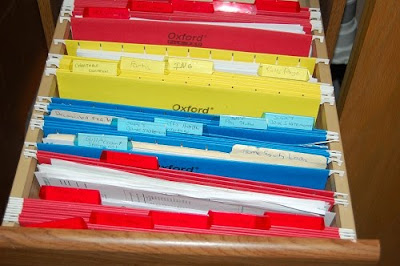
- I empty all my files into one big folder and label it with the year that just past.
- This folder gets placed in an archive box with the last 6 years of documents.
- Then, I remove the oldest file in that box and shred it.
Playing along with Tackle It Tuesday with 5 Minutes for Mom .
Tuesday, May 10, 2011
Organizing Your Contacts
So, if you have moved recently or changed your phone number, cell number or email address and I am supposed to know it for some reason, let me know. Because now, I can add it easily and I won't ever lose it again:-)
Playing along with Tackle It Tuesday with 5 Minutes for Mom .
Friday, April 8, 2011
Spring Cleaning Reward
And of course, we needed a new entertainment center and that needed to be organized too so, it totally counts for this link up too:-)
Tuesday, March 29, 2011
Organized Linen Closet
Now, this is much better!
Friday, March 25, 2011
Organizing Your Kid's Art Supplies

Now, she has a place for all her markers and crayons and paper and jewelry making supplies and other art supplies. It is AWESOME!!
Friday, March 18, 2011
Paper Clutter
Don't forget, now is a perfect time to do your year-end filing. I did mine this weekend and I am all ready to start chomping away at this year's bills:-)

Here is what I do:
- I empty all my files into one big folder and label it with the year that just past.
- This folder gets placed in an archive box with the last 6 years of documents.
- Then, I remove the oldest file in that box and shred it.
Now, I have all the documents that I need to retain for the IRS-required amount of time and a filing system that works:-)
This was not so Wordless Wednesday at 5 Minutes for Mom today but more Wordful Wednesday on parenting By dummies:-)
Tuesday, March 8, 2011
Organize the Basement
Wednesday, January 26, 2011
Organizing Your Calendar Part 5
1. We started off with Part 1 writing or typing everything we did to gain awareness on how we spend our time.
2. Part 2 looked at lining our time up with our values.
3. In Part 3, we broke down our calendar into usable chunks and
4. Part 4, we talked about the difference between our calendar and our to do list.
Now, that you have all those piece in place, we have to put it all together. Remember that picture of my calendar I posted in the first post?
If you look closely, you will see that each piece of my advice is in play on this calendar. I have everything I do listed on the calendar. I have different colors for each family member and for the different things that I am involved in. I know when and where I can fit in to do list items. The last thing that takes it to another level...
You can import calendars into yours too! You don't want to schedule that romantic dinner right in the middle of the Super Bowl. So, import your favorite sports team calendar. Vacation planning helps when you know the National Holidays with a holiday calendar. And, if you are planning on gardening outside, wouldn't it be nice to know if it is going to rain that day or not? Import a weather calendar for your area to help with this. Keeping track of these details will prevent you from getting double-booked and you will use your time wisely:-)
I hope you found this series to be useful. If you have any questions about managing your time better, feel free to leave a comment here and I will get back to you as quick as I can. Better yet, I started a thread in my Blog Frog Community so that everyone can benefit from the answers to your questions.
Playing along with Wordless Wednesday at 5 Minutes for Mom and Wordful Wednesday on parenting By dummies:-)
Tuesday, January 18, 2011
Organizing Your Calendar Part 4
Let me start by saying that the words calendar and to do list are not interchangable. Your calendar holds the events of your life and things that you have to complete daily. Your to do list is a collection of tasks that you do periodically or not often like cleaning out a closets or doing your taxes.
As with my calendar, I have my to do list separated into different categories. I have a different list for cleaning, family, gardening, baking, volunteering and business. Then, it becomes a matter of priorities. In the spring, my cleaning to do list takes center stage. Conversely, fall is a big baking time and summer has a lot of gardening. For these priority times, I usually set aside a day to knock those jobs off. For the other items, I fit them in where there are gaps in my calendar. That's why it is important to know when you have time and what you are going to do when those times come.
Lastly, be realistic about how long things take. If you have to completely dig out the mess in your basement, it isn't something you can fit into the 5 minutes before you pick up the kids from school. Set aside a day to knock some of that project off. Be aware of the things that you can get done in 5 minutes. There is nothing more satisifying then marking something off that list but know what you can do and when.
As you can see, tackling your calendar isn't an exercise in futility. It is definitely a necessity and a happy Tackle It Tuesday with 5 Minutes for Mom ! Next week, I am going to finish my series with an advanced class. If you want to take your calendar to the next level, come back then:-)
Tuesday, January 11, 2011
Organizing Your Calendar Part 3
Part 1 of this series showed you how to add everything that you do to your calendar. Now, let's break that calendar down into manageable parts. Here is the week view of my basic calendar:
Any events that I share with the family like meals, I put into a family calendar. Simply click "Add Calendar", name it Family and click ok. Then, go into those shared events and change it to the Family calendar. It will look like this:
(If you are doing this with pen and paper, you can highlight the shared events in a different color.)
Now, you are probably asking yourself, what is the point of this exercise? I am an extremely visual person. Therefore, having the different events for different things in different colors, really hits it home with me that certain things take a certain amount of time. When a task is done, it is time to shift gears and do something else. The biggest time highjacker is not letting go and not moving on to the next thing.
So, I guess the message here is make sure that whatever method you use, allows you to see a start AND a finish to all your events and tasks.
As you can see, tackling your calendar isn't an exercise in futility. It is definitely a necessity and a happy Tackle It Tuesday with 5 Minutes for Mom ! Next week, we will tackle the To Do List portion of your calendar.
Wednesday, January 5, 2011
Out with the Old, In with the New

Here is what I do:
- I empty all my files into one big folder and label it with the year that just past.
- This folder gets placed in an archive box with the last 6 years of documents.
- Then, I remove the oldest file in that box and shred it.
This was not so Wordless Wednesday at 5 Minutes for Mom today but more Wordful Wednesday on parenting By dummies:-)
Tuesday, January 4, 2011
Organizing Your Calendar Part 2
1. Show you inconsistencies between your values and how you actually spend your time. Just like other areas of your life (i.e. losing weight, budgeting, etc.), your calendar is all about awareness. That is why I had you go through the exercise of recording everything you do. Once it is laid out in black and white (or in colors:-), you can see where your priorities lie. The key is getting your calendar in line with your values. If a clean house is your priority, that is what will show up on your calendar. If you value your job, your time will be consumed by your career. If your kids are number 1, guess who will be on your agenda? The problem with those who are unsatisfied with their time management is that their values do not line up with how they are actually spending their time.
2. Help you with emotional barriers. Often times, I will sit down at the end of the day and feel guilty about everything that I didn't get done that day. By having a well-organized calendar, you can reflect on your day and really see that you didn't waste a day in your life. Maybe, you planned to clean the basement but instead, cruised the net all day. What a waste, right? Maybe not. Go back and look at what you really did. Maybe you really needed to brainstorm a project for work. Or maybe you had an idea that you really needed exorcised. Or maybe, just maybe...you needed a break. Which leads me to my next point...
3. Ensure that you show up in your life. A well-organized calendar will show you how much you do for others but, what about you? Make sure that you are on your calendar. A work out, a mani and pedi, or lunch with a friend are great ways to refuel your mind and spirit. I can hear the objections right now. "Yeah, I wish I had time for a mani! I have to many responsibilities" As a wife, mother, sister, friend, caregiver, volunteer, businesswoman, gardener, baker, I am completely in touch with that emotion. However, may I suggest that you cannot afford NOT to make time for yourself? Along with all of your other responsibilities, you are also charged with keeping yourself going. So, look at your calendar and find a pocket of time for you and DO NOT feel guilty about it! It is your responsibility:-)
4. Empower you. If knowledge is power, then a well-organized calendar is a turbo blast to your life. If you know how you spend your time, you can confidently turn down requests that do not line up with your values. The next time your neighbor asks you (the stay-at-home-mom) to pick up her kids for the third time this week during your afternoon meditation, you can say, "I am sorry. I would love to help but, that just doesn't work for me." You can say that confidently because you know that you aren't just "lying around doing nothing". You are honoring your body's request for rest and it is your responsibility to take care of yourself!
As you can see, tackling your calendar isn't an exercise in futility. It is definitely a necessity and a happy Tackle It Tuesday with 5 Minutes for Mom !
Thursday, December 30, 2010
Organizing Your Calendar
Pretty scary looking, isn't it? Well, Rome wasn't built in a day. I have been working on perfecting my system for over 10 years. Now, you can benefit from my time well-spent. Let's take it one step at a time.
1. I use Google Calendar and therefore, this series will be in that format. The platform doesn't matter but the steps do. So, if you prefer another electronic version or even if you are a pen and paper person, you can find success with this method.
2. Write down everything you do daily. I mean everything. Showers, meals, work, working out...EVERYTHING. It will look something like this:

Sorry it is hard to read. I couldn't figure out how to post a day view:-(
3. Next, duplicate your daily schedule for the whole week, month and year. In Google, you simply go into the event that you have created and select "Edit Event Details" and then "Repeat". Next "Repeats"= Daily and "Repeat Every"= 1 Days. If you follow these steps, it will look something like this:
Now, you have the basis in which to springboard into true time management. From here, you can see where you have pockets of time to fill with tasks. You can also add calendars for everyone and everything that you are responsible for and color code it!!!! The possibilities are endless!!! Yahoo!! Sorry...I got carried away there:-)
Next week, I will break the calendar down into chunks of time. This shift in thinking will have you looking at your calendar and your time in a whole new light:-)
Tuesday, September 21, 2010
Organizing the Breezeway Cabinet
Tuesday, May 18, 2010
The Move Back
So Bye, Bye Barbie:-) See you in the fall!
Tuesday, January 26, 2010
Bill Organization
And after:
Much more manageable!
Tuesday, January 19, 2010
Organizing the Linen Closet
So, I spent some quality time to get a handle on the situation.
I use labels like thes for each room to help me stay organized throughout the year:
Tuesday, January 12, 2010
Calendar Organization
In order to get vacation time requested, it is important to figure out annual doctor's appointments, big projects and trip dates early. If your house is anything like mine, you have information coming at you in a million different directions. On paper, my calendar look like this:
Not the best system for someone who is dyslectic like me so, I use Google Calendar. It is color coded for each member of my family and/or by activity (i.e. gardening, work, cleaning, etc.). You can import calendars too. I have all my U.S. holidays on there and sports schedules so we know when and where the Packers are on. I even have an up-to-date weather forecast on my calendar so, I know if I need to move stuff around for a pending snow storm or if we need a plan B for outdoor activities. I meal plan on my calendar and I even started an editorial calendar for my blog. It is all right there in one spot! I love it!
Believe me, I need to make every second of my day count and Google Calendar helps me to do it:-) How do you keep track of your schedule?
Disclosure: I was not paid by Google in any way shape or form for this review. I just really, really love my Google Calendar and when I find something that works for me, I shout it from the rooftops:-)